Website Audit: 10 Key Areas to Review for Better SEO, Performance and Conversions
You’ve launched a new website, but it isn’t generating the expected results. Your organic traffic is declining, your site feels slow, or visitors aren’t turning into customers.
Perhaps your website is several years old, your technical environment is outdated, or your content no longer reflects your business. You may even be considering a redesign without knowing whether it would solve the underlying problems.
Before investing in major changes, you need to understand what’s actually wrong.
A website audit examines your site’s technical health, search visibility, user experience, content, competitive position and ability to generate business. It identifies problems, uncovers opportunities and helps you determine which improvements deserve attention first.
At Knok Studios, we approach website audits by combining technical analysis, SEO, UX/UI, content strategy and analytics. The objective isn’t to collect as many warnings as possible: it’s to turn evidence into a practical improvement plan.
Here are the 10 key areas to review, the tools to use and the issues to look for.
1. Competition: understand your market and benchmark your website
Your website competes for attention against businesses offering similar products or services, but your online competitors may not be the same as your direct commercial competitors.
Google’s results may be dominated by directories, marketplaces, specialist publishers or review platforms. Understanding these competitors helps you identify what your website needs to do differently to attract the right audience.

What to audit
- Organic search competition: Identify the websites ranking for the queries that matter to your business. Compare the pages that appear in the results, their content, their search intent and the services they promote.
- Content gaps: Look for useful information, service pages, case studies, comparison guides or resources that competitors offer but your website lacks. Don’t create a page simply because a competitor has one; establish whether it answers a real customer need.
- Value proposition: Compare how competitors explain their offer, demonstrate expertise and differentiate themselves. Check whether your own website communicates its advantages clearly within the first few seconds.
- Features and functionality: Examine features that support the customer journey, such as quote calculators, online booking, product filters, customer portals, live chat or detailed FAQs.
- Search-result presentation: Compare titles, descriptions, review information and other visible elements. A competitor’s stronger result may attract more clicks even when ranking positions are similar.
Tools to use
- Ahrefs or Semrush: Research competing domains, organic keywords, ranking pages and backlink profiles.
- Similarweb: Investigate estimated traffic sources and audience acquisition patterns.
- Wappalyzer: Identify the technologies and platforms used by competing websites.
- Google Search Console: Benchmark your own query and page performance against previous periods.
- Google Trends: Check whether interest in a product, service or topic is increasing or declining.
What should the audit deliver?
Create a competitor comparison identifying your most important search competitors, the pages they rank with, the gaps in your own website and the improvements most likely to create a commercial advantage. Prioritize opportunities where the search intent matches a service or product you actually want to sell.
2. Analytics: understand what visitors do on your website
Traffic alone doesn’t tell you whether a website is performing well. You need to understand where visitors come from, which pages they use, what actions they take and where they abandon important journeys.

What to audit
- Traffic acquisition: Compare organic search, paid advertising, referral traffic, direct traffic, email and social media. Look for meaningful changes in channel contribution rather than focusing exclusively on total sessions.
- Landing pages: Identify the pages that attract the most visitors and evaluate whether they satisfy the intended purpose. A popular article that never directs visitors towards a relevant service may have limited commercial value.
- Conversion tracking: Test your contact forms, telephone links, quote requests, bookings and checkout process. Confirm that successful actions trigger the correct analytics events and that one action isn’t counted multiple times.
- User journeys: Examine the pages visitors view before converting, the steps where they abandon a process and the differences between new and returning visitors.
- Device performance: Compare desktop and mobile behaviour. A high abandonment rate on mobile may indicate a usability issue, slow page loading or an unnecessarily complicated form.
- Traffic anomalies: Compare equivalent date ranges and investigate significant changes. Check whether a decline coincides with a website update, migration, campaign change or tracking issue.
Don’t interpret bounce rate in isolation. A visitor who quickly finds your phone number or opens a contact form may have accomplished their goal without browsing further.
Tools to use
- Google Analytics 4: Analyse acquisition channels, landing pages, engagement and configured conversions.
- Matomo: Measure traffic and user journeys as an alternative analytics platform.
- Google Tag Manager: Audit tracking tags and conversion-event implementation.
- Microsoft Clarity or Hotjar: Review session recordings and heatmaps, subject to appropriate consent and privacy controls.
- Google Search Console: Compare organic search performance with what happens after visitors reach the website.
What should the audit deliver?
A reliable baseline covering sessions, qualified leads or sales, conversion rates and performance by acquisition channel. If conversions are not being tracked correctly, fix the measurement setup before using the data to justify major marketing decisions.
3. UX/UI: identify friction in the user experience
A website can look attractive and still be difficult to use. Visitors need to understand what the business offers, find the information they need and complete important actions without unnecessary friction.

What to audit
- Visual hierarchy: Check whether the main message, essential information and primary call to action are immediately identifiable. Visitors shouldn’t have to guess what the website is offering.
- Navigation: Review menu labels, page hierarchy, internal navigation and the ease of reaching important pages. Check whether users can find a service, product, price or contact option without excessive clicks.
- Readability and accessibility: Test text size, colour contrast, line spacing, keyboard navigation, focus indicators and form labels. Do not assume that a particular font size automatically creates an SEO penalty; the objective is to provide readable, accessible content.
- Forms and checkout: Complete the main conversion journeys yourself. Look for unnecessary fields, confusing validation messages, mandatory account creation, unexpected costs and poorly displayed error messages.
- Mobile usability: Test the site on actual mobile devices or realistic emulations. Check overlapping elements, menus, buttons, text wrapping, sticky banners and elements that obstruct the main content.
- Trust and reassurance: Make sure visitors can find relevant customer reviews, contact details, delivery or return information, credentials and other evidence they need before making a decision.
Tools to use
- Google Lighthouse: Identify accessibility and performance issues, alongside other quality diagnostics.
- WAVE or axe DevTools: Detect common accessibility problems that require further testing.
- Microsoft Clarity or Hotjar: Identify confusing user journeys and recurring points of friction.
- Browser developer tools: Test responsive layouts and diagnose interface problems.
- Manual usability testing: Ask users or colleagues unfamiliar with the website to complete specific tasks without assistance.
Automated accessibility tools can identify many problems but cannot establish that a website is fully accessible. Keyboard testing, manual review and, where appropriate, testing with assistive technologies remain important.
What should the audit deliver?
A prioritized list of usability problems, supported by screenshots or observations, with the pages affected and the recommended fixes. Start with issues that prevent visitors from understanding the offer or completing a valuable action.
4. Website speed: measure real performance and find the causes
Website speed affects usability, particularly on mobile devices and slower connections. Performance problems can also contribute to a poor page experience.
However, running one speed test and looking at the overall score isn’t sufficient. You need to identify which pages are slow, what users experience and which technical changes will make a meaningful difference.

What to audit
- Core Web Vitals: Review the three user-experience metrics used in Google’s Core Web Vitals:
- Largest Contentful Paint (LCP): Aim for 2.5 seconds or less.
- Interaction to Next Paint (INP): Aim for 200 milliseconds or less.
- Cumulative Layout Shift (CLS): Aim for a score of 0.1 or less.
These thresholds apply to the 75th percentile of visits, rather than to a single laboratory test. Google’s Core Web Vitals documentation explains the metrics and how to interpret them.
- Server response: Check Time to First Byte (TTFB), hosting resources, caching and database response times. Slow server responses may indicate inadequate hosting capacity, inefficient queries or an application that needs optimization.
- Images and media: Identify oversized images, unsuitable dimensions, unnecessary autoplay videos and missing responsive image variants. Use appropriate modern formats such as WebP or AVIF when supported by your workflow.
- JavaScript and CSS: Investigate unnecessary scripts, render-blocking resources, heavy third-party integrations and unused code. Page builders, analytics, chat widgets and advertising scripts can all contribute to page weight.
- Caching and content delivery: Review browser caching, server-side caching and CDN configuration. If the audience is international, test pages from locations that represent the actual user base.
- Template-level problems: Check several representative pages, not just the homepage. An issue affecting a product template or a shared header can affect a large proportion of the site.
Tools to use
- PageSpeed Insights: Review field data where available and laboratory diagnostics.
- Google Search Console: Identify groups of URLs with poor Core Web Vitals.
- Lighthouse: Run controlled tests and investigate individual performance opportunities.
- WebPageTest: Analyse loading behaviour, request waterfalls and performance from different locations.
- GTmetrix: Monitor page performance and identify large resources or slow requests.
What should the audit deliver?
A list of representative URLs, their performance measurements, the technical causes of the problems and the expected scope of each fix. Prioritize changes that improve the real user experience. A higher laboratory score alone does not guarantee improved rankings or conversions.
5. Technical environment: check the software stack, versions and security
A website depends on more than its visible design. Its CMS, programming language, database, server, plugins, themes and external integrations all need to remain compatible, maintained and secure.
An old website may continue to function while running software that no longer receives security updates. Conversely, blindly upgrading every component to the newest release can introduce compatibility problems.
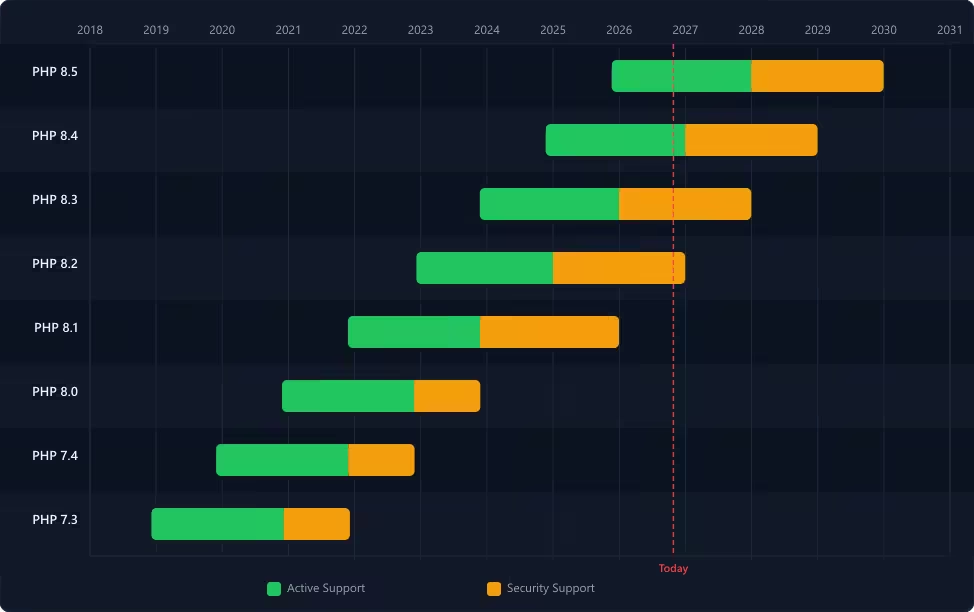
What to audit
- PHP and other runtime versions: For WordPress sites, identify the active PHP version and compare it with the official support lifecycle. WordPress.org recommends PHP 8.3 or later. PHP 7.x and other unsupported versions should trigger an upgrade assessment; older releases may expose the site to unpatched vulnerabilities. Check the official PHP supported versions table before recommending an upgrade. Do not assume that the newest runtime is automatically compatible with every plugin or custom component. For other stacks, review the corresponding support policy for Node.js, Python, Ruby, Java or the framework in use.
- CMS, themes and plugins: Check the versions of WordPress or the relevant CMS, its active theme and its plugins. Identify abandoned extensions, known vulnerabilities, incompatible components and functionality that is duplicated across several plugins.
- Database and web server: Record the database engine and version, the web server and relevant application-server components. Check that they meet the platform’s supported requirements. WordPress currently recommends MariaDB 10.11 or later, or MySQL 8.0 or later, and HTTPS support.
- SSL/TLS and access control: Confirm that HTTPS works correctly, that certificates are valid and that administrative access is limited to the people who need it. Review unused accounts, administrator privileges, authentication settings and exposed development environments.
- Backups and recovery: Check backup frequency, retention, storage location and recovery procedures. A backup should not be considered reliable until restoration has been tested.
- Integrations and dependencies: Test contact forms, CRM connections, payment services, email delivery, APIs and tracking scripts. Identify failures and external services that could create a single point of failure.
Tools to use
- WordPress Site Health: Review basic WordPress configuration, server information and recommended improvements.
- WPScan: Investigate WordPress-specific security issues and known vulnerabilities.
- PHP’s official supported versions table: Check runtime lifecycle and support status.
- SSL Labs: Test public SSL/TLS configuration.
- PHP information and server configuration tools: Verify runtime and extension details, using protected administrative access rather than exposing diagnostic information publicly.
- The CMS or framework’s official requirements: Verify supported server, database, language and dependency combinations.
For WordPress, the official security guidance emphasizes keeping the core platform, themes and plugins up to date, choosing actively maintained components and configuring access appropriately.
What should the audit deliver?
A technical inventory listing the current stack, the support status of each critical component, identified vulnerabilities and compatibility risks, and a realistic upgrade plan. Separate urgent security issues from routine maintenance and performance improvements. Test significant runtime and CMS upgrades in a staging environment, then verify the site after deployment.
6. Google rankings: identify SEO problems and opportunities
A website can be technically sound and still fail to attract relevant organic traffic. An SEO audit needs to examine actual search performance, not simply the results of an automated crawler.

What to audit
- Search Console performance: Compare clicks, impressions, CTR and average position over equivalent periods. Separate pages and queries that have gained visibility from those that have lost it.
- Search intent and keyword targeting: Verify that each important page satisfies the needs behind its target queries. A page aimed at a commercial search should provide information that helps the visitor choose a service or product, not just a generic explanation.
- Indexing and canonicalization: Investigate important URLs that are excluded from the index, duplicated, redirected or assigned an unexpected canonical. Confirm that the intended pages can be crawled and indexed.
- Titles and descriptions: Check whether page titles accurately describe the content and differentiate the page from competing results. Review the search snippet where possible, but remember that Google may generate a different title or description based on the query.
- Internal links: Identify important pages with few relevant internal links and content sections that do not connect to related commercial pages.
- Search demand: Use Google Trends to investigate whether interest is changing over time. Compare relevant locations, topics and search terms, while remembering that Trends data represents relative search interest rather than absolute search volume.
Tools to use
- Google Search Console: Analyse search queries, page performance, indexation and Core Web Vitals.
- Screaming Frog SEO Spider or Sitebulb: Crawl the website and identify problems with status codes, titles, headings, canonicals, redirects and internal links.
- Ahrefs or Semrush: Research keyword opportunities, competing pages and backlink profiles.
- Google Trends: Check changes in interest and seasonality.
- Google’s URL Inspection tool: Investigate individual pages that may have indexation problems.
What should the audit deliver?
A list of priority URLs and queries, the observed performance issue, the recommended change and the metric that will be monitored after implementation. For example, a page with many relevant impressions but a low CTR may need a better title and clearer alignment with the search intent. A page losing impressions and positions needs a deeper diagnosis before you rewrite it.
Do not automatically interpret every traffic decline as an algorithm penalty. Check for technical errors, recent website changes, seasonality, changes in demand and broader search-result changes.
7. Content: evaluate quality, relevance and actual performance
Content can become outdated without the underlying topic losing its value. A content audit determines whether existing pages should be refreshed, expanded, consolidated or removed.

What to audit
- Accuracy and freshness: Identify obsolete statistics, discontinued products, old screenshots, broken links and technical recommendations that are no longer valid.
- Intent and usefulness: Ask whether each page answers a specific question or helps visitors complete a task. Look for generic content that repeats what competing pages already say without adding practical guidance, evidence or expertise.
- Performance and business relevance: Compare organic visibility and traffic with the page’s intended purpose. An article attracting substantial traffic on an irrelevant topic may have limited commercial value, while a low-traffic service guide could still deserve improvement if it supports an important business objective.
- Overlapping content: Identify pages that target very similar queries or fulfil the same purpose. Decide whether they should remain separate, be differentiated or be consolidated.
- Internal links and conversion paths: Ensure that useful articles connect to relevant services, case studies or related resources. These links should help readers, rather than exist solely to repeat commercial keywords.
- Accuracy of claims and sources: Verify that claims are supported by credible evidence. Replace outdated figures or remove claims that cannot be substantiated.
Tools to use
- Google Search Console: Identify pages and queries gaining or losing search visibility.
- Google Analytics 4 or Matomo: Measure traffic and conversion behaviour.
- Screaming Frog or Sitebulb: Export URLs, metadata, headings, word counts, internal links and status codes.
- Google Trends: Investigate changes in topic interest.
- Ahrefs or Semrush: Examine keyword overlap and competing pages.
What should the audit deliver?
A content inventory with a clear action for each page: keep, update, consolidate, redirect or remove.
Do not delete articles simply because they are old or have little traffic in a short reporting period. Review their search history, backlinks, relevance and role in the website before making that decision.
Content duplication also requires context. Similar pages can create confusion or unnecessary maintenance, but duplication does not automatically mean a Google ranking penalty. Choose a solution based on the purpose of the pages and the signals Google receives.
8. Backlinks and domain authority: assess your external link profile
Links from other websites can help users discover your business and provide context about your expertise. But not all links are equally valuable, and an audit should distinguish legitimate editorial references from patterns that may indicate manipulative link building.

What to audit
- Referring domains: Review the websites linking to your domain, the pages receiving links and changes over time. Identify relevant industry publications, professional associations, partners and customer references.
- Link relevance and context: Check whether links appear naturally within relevant content. A link from an unrelated website is not automatically harmful, but a large pattern of irrelevant, manipulative links warrants closer investigation.
- Anchor text distribution: Review the text used in links pointing to the site. Look for unusually large concentrations of commercial exact-match anchors, particularly when they appear within paid placements, automated links or low-quality directories.
- Acquisition patterns: Investigate unexpected spikes in backlinks, repeated sitewide links, networks of similar websites and links created through automated services. Determine whether there is a plausible editorial or business reason for the pattern.
- Outbound links: Review whether your own site links to questionable destinations or participates in excessive link exchanges, paid link schemes or other practices intended to manipulate rankings.
- Spam Score and Domain Authority: Metrics from Moz and other SEO tools can help organize investigations, but they should not be treated as Google’s own assessment of a domain. A high Spam Score alone does not prove a penalty, just as a high Domain Authority score does not guarantee strong rankings.
Tools to use
- Google Search Console’s Links report: Export external links, top linking sites and common anchor text.
- Ahrefs: Analyse backlinks, referring domains, anchor texts and historical link changes.
- Semrush: Review referring domains, backlink patterns and potentially suspicious links.
- Moz Link Explorer: Examine Domain Authority and Spam Score as third-party diagnostic indicators.
- Majestic: Investigate backlink patterns using its link-analysis metrics.
Google provides guidance on link spam and the Disavow links tool. The disavow tool is an advanced feature that should be used cautiously. Do not disavow every link flagged by an SEO tool: first establish whether there is a substantial pattern of artificial or manipulative links and whether Google’s criteria for disavowal are met.
What should the audit deliver?
A documented backlink review separating valuable editorial links, neutral or uncertain links, and links that warrant investigation. Where actual manipulative link schemes are identified, prioritize removal or correction before considering disavowal.
The objective is to understand your external link profile and reduce genuine risks, not to chase a third-party score.
9. AI-assisted discovery: check whether your content can be understood and cited
Search is evolving, and users increasingly encounter information through AI-assisted search features and conversational tools. An audit should consider these discovery paths without treating speculative optimization techniques as established ranking requirements.

What to audit
- Accessibility of important information: Check that your main services, product details, expertise, business information and key answers are available in crawlable text rather than being communicated only through images or inaccessible interface elements.
- Content clarity: Verify that pages explain their subject accurately, use descriptive headings and answer specific questions without unnecessary ambiguity.
- Structured data: Review appropriate Schema.org markup and validate it with Google’s testing tools. Structured data must match the page’s visible content; it is not a guarantee of inclusion in search features or AI-generated answers.
- Brand and entity consistency: Check whether your business name, services, contact details and descriptions are consistent across your website and relevant external sources.
- Discovery and referral measurement: Monitor measurable referrals from AI tools where analytics identifies them. Where appropriate, manually test relevant questions in AI-assisted search experiences to understand which sources and brands are being cited. Treat these observations as samples, not comprehensive ranking measurements.
- Technical accessibility: Verify that important pages are crawlable and that the site’s architecture does not unnecessarily prevent discovery. Review access controls and crawler policies in accordance with your preferences and the services you intend to support.
Google’s guidance on AI features and your website states that its foundational SEO practices remain applicable to AI Overviews and AI Mode. There is no special markup that guarantees inclusion in these experiences.
Tools to use
- Google Search Console: Track conventional search performance and available search-feature data.
- Google Analytics 4 or Matomo: Examine identifiable referral traffic and subsequent conversions.
- Google Rich Results Test: Validate supported structured data on individual pages.
- Screaming Frog: Crawl important pages, headings, metadata and structured data.
- Server logs and browser tools: Investigate crawler access and technical problems where necessary.
What should the audit deliver?
A list of technical and content improvements that make important information accessible, accurate and useful. Separate measurable opportunities from experimental observations about AI discovery, and avoid investing in proprietary AI visibility scores without a clear use case.
10. Social media, reviews and online reputation
Your website is only one part of your online presence. Potential customers may discover your business through search engines, maps, social platforms, directories, review websites and industry-specific marketplaces.
An audit should determine where your audience looks for information and whether your business has a credible, consistent presence on those platforms.

What to audit
- Business profiles: Check that your company name, contact details, opening hours, services, photographs and website links are correct wherever your business is listed.
- Reviews and reputation: Assess review volume, recency, recurring customer feedback and the quality of management responses. Look for repeated complaints that reveal operational problems, such as slow support, unclear pricing or delivery delays.
- Choose platforms that fit your industry:
- Google Business Profile and Google Maps: Important for businesses serving specific locations, such as restaurants, clinics, tradespeople, shops and other local services.
- TheFork: Particularly relevant to restaurants that use its platform for reservations and customer reviews.
- Tripadvisor: Relevant to hotels, attractions, tour operators, restaurants and other travel-related businesses.
- Trustpilot: Useful for many e-commerce businesses, online services and companies whose customers research reputation before buying.
- G2 and Capterra: Relevant to B2B software, SaaS products and technology vendors.
- Houzz: Useful for interior designers, home renovation businesses and certain architecture and construction services.
- LinkedIn: Particularly useful for B2B companies, professional services and employer credibility.
- Social media activity: Review whether your business is active on the platforms that matter to its audience. Focus on the relevance and quality of publications, response times and whether social profiles lead visitors towards useful information.
- Website integration: Check that relevant reviews, case studies and testimonials are presented accurately on your website. Make it easy for prospects to find supporting evidence without relying exclusively on third-party ratings.
- Review management: Establish a consistent process for requesting feedback from genuine customers and responding professionally to complaints. Never buy fake reviews or offer incentives in exchange for positive ratings in violation of platform policies.
Tools to use
- Google Business Profile: Manage local business information and customer reviews.
- Trustpilot Business: Monitor reviews and reputation on Trustpilot.
- TheFork Manager: Manage the restaurant’s presence and relevant reservation activity on TheFork.
- Tripadvisor’s business tools: Review the company’s presence on the platform.
- LinkedIn and native social analytics: Examine audience engagement and referral activity.
- Google Analytics 4: Measure referral traffic and conversions from these channels where tracking permits.
What should the audit deliver?
An inventory of relevant platforms, inaccurate business information, reputation issues and opportunities to improve credibility. Prioritize platforms that influence real customer decisions rather than treating review count or social follower totals as success metrics in isolation.
How often should you audit your website?
For a practical schedule, distinguish routine monitoring from a full website audit.
- Monitor performance every month. Review the main analytics and Search Console indicators, important conversion paths, technical alerts and any significant changes in traffic or rankings. Website maintenance, security updates and backup checks should follow an appropriate ongoing schedule, not wait until the annual audit.
- Conduct a comprehensive audit every 12 months if your website is central to customer acquisition, you publish frequently or you actively invest in SEO and digital marketing.
- Consider a full audit every 18–24 months for a relatively stable brochure website, provided that you still monitor performance and maintain the technical environment between reviews.
Regardless of the schedule, conduct a focused investigation when there is a significant traffic decline, website migration, redesign, CMS change, major integration or unexplained drop in conversions.
A monthly monitoring routine does not replace a comprehensive review. Conversely, an annual audit should not be an excuse to ignore a serious technical or commercial problem until the next scheduled review.
How to prioritize the findings
A website audit can identify hundreds of potential improvements, but not all deserve the same priority.
For each finding, record the affected page or component, the evidence, the likely impact, the recommended fix, the effort required and how the result will be measured.
| Priority | Examples |
|---|---|
| Critical | Serious security vulnerabilities, broken purchase or lead-generation journeys, accidental deindexation of essential pages. |
| High | Major performance problems, important service pages losing visibility, widespread navigation or technical failures. |
| Medium | Outdated strategic content, weak internal linking, recurring accessibility problems, ineffective landing pages. |
| Low | Cosmetic refinements with limited effect on accessibility, usability or business goals. |
These categories should reflect the specific website. A broken product-filtering feature may be critical for a large e-commerce store but irrelevant to a small brochure website.
Prioritize high-impact, well-understood problems first. Where the cause is uncertain, investigate before implementing a potentially disruptive change.
Turn your website audit into a growth plan
A useful website audit does more than produce a report. It explains what needs to change, why the change matters, and how to verify its impact.
At Knok Studios, we combine technical analysis, SEO, content, UX/UI and business objectives to develop recommendations tailored to each project.
For example, our France Bus case study illustrates how website performance, technical considerations, organic visibility and multilingual requirements can form part of a wider digital improvement project.
Whether you need to diagnose declining organic traffic, prepare for a redesign, improve conversion rates or review an aging technical environment, a structured audit provides a clearer basis for your decisions.